Building a Windows Terminal Emulator
March 03, 2026 · Part 1 of WinTer
Writing a Terminal Emulator from Scratch in C
View on GitLab (pull requests welcome)
How Does a Terminal Actually Work?
When you open a terminal and type a command, what is actually happening behind the scenes?
- How do you host a shell like
cmd.exeorpowershell.exeinside your own application? - How do you capture the output of those programs before it hits the screen?
- What format is text saved in memory so it can be scrolled and resized?
- How does the terminal know to print text in red, or move the cursor up two lines?
- How are emojis and wide characters (like CJK) handled in a fixed-width grid?
- How do you avoid flickering when redrawing the window 60 times a second?
These questions sound simple but each one hides a rabbit hole. Hosting a shell process requires understanding how the OS manages pseudo terminals. Capturing output means dealing with kernel pipe buffers and threading. Parsing text color requires implementing a subset of the VT100 escape sequence standard. Rendering without flicker requires understanding how GPUs and swap chains work.
In short a terminal emulator touches almost every layer of a modern operating system. It is one of those projects where you cannot fake your way through it. You either understand what is happening, or nothing works.
I am building a Windows terminal emulator from scratch in C to find out. I am going to document every step of the process as I go, in the same spirit as cstack’s Let’s Build a Simple Database breaking the problem into layers, understanding each one before moving to the next, and writing about it as honestly as I can.
What We Are Building
The project is called WinTer (Windows Terminal). It is a terminal emulator targeting Windows, written in C11, using the modern Windows Pseudo Console (ConPTY) API to communicate with the OS.
The goal is not to ship a replacement for Windows Terminal. The goal is to understand, at the implementation level, how a terminal emulator actually works and to produce something real along the way. The code lives on GitLab and will be production quality, even if the feature set starts small.
We will not be using any terminal emulator libraries. No VTE, no libtsm, no libuv. Every layer gets built from scratch.
Architecture Overview
A terminal emulator is a middleman between you and the shell. To retrieve, parse, and draw data, our terminal will pass data through a chain of three distinct layers:
- The OS Interface (Plumbing): Spawning the shell process, attaching it to ConPTY, and managing the memory pipes that stream raw byte data back and forth.
- The State & Parser (Brain): The raw byte stream from the shell is full of invisible ANSI escape sequences. This layer parses those sequences to maintain an internal model of the terminal grid cursor position, text colors, character data.
- The Renderer (Face): A loop that reads the internal grid model and uses a graphics API to draw the characters to your monitor, 60 times per second.
Each layer only talks to the layers next to it. The renderer does not care about pipes. The parser does not care about fonts. This is what keeps the project from turning into an unmanageable mess.
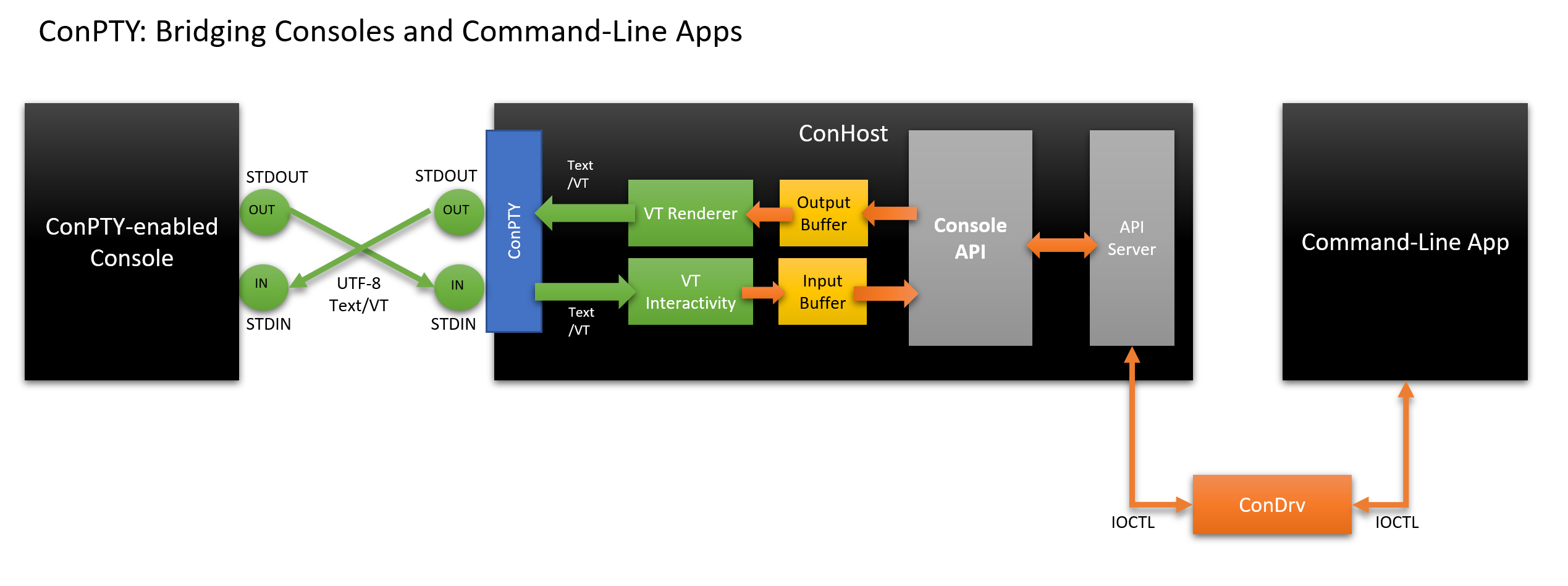
Table of Contents
Chapter 1: The Terminal Application (OS Integration)
Chapter 2: The Terminal Text Buffer (State & Parsing)
- (Coming soon)
“What I cannot create, I do not understand.” – Richard Feynman
Hosted on GitHub Pages